Two copies of the truth are one too many

Your documentation is living a double life.
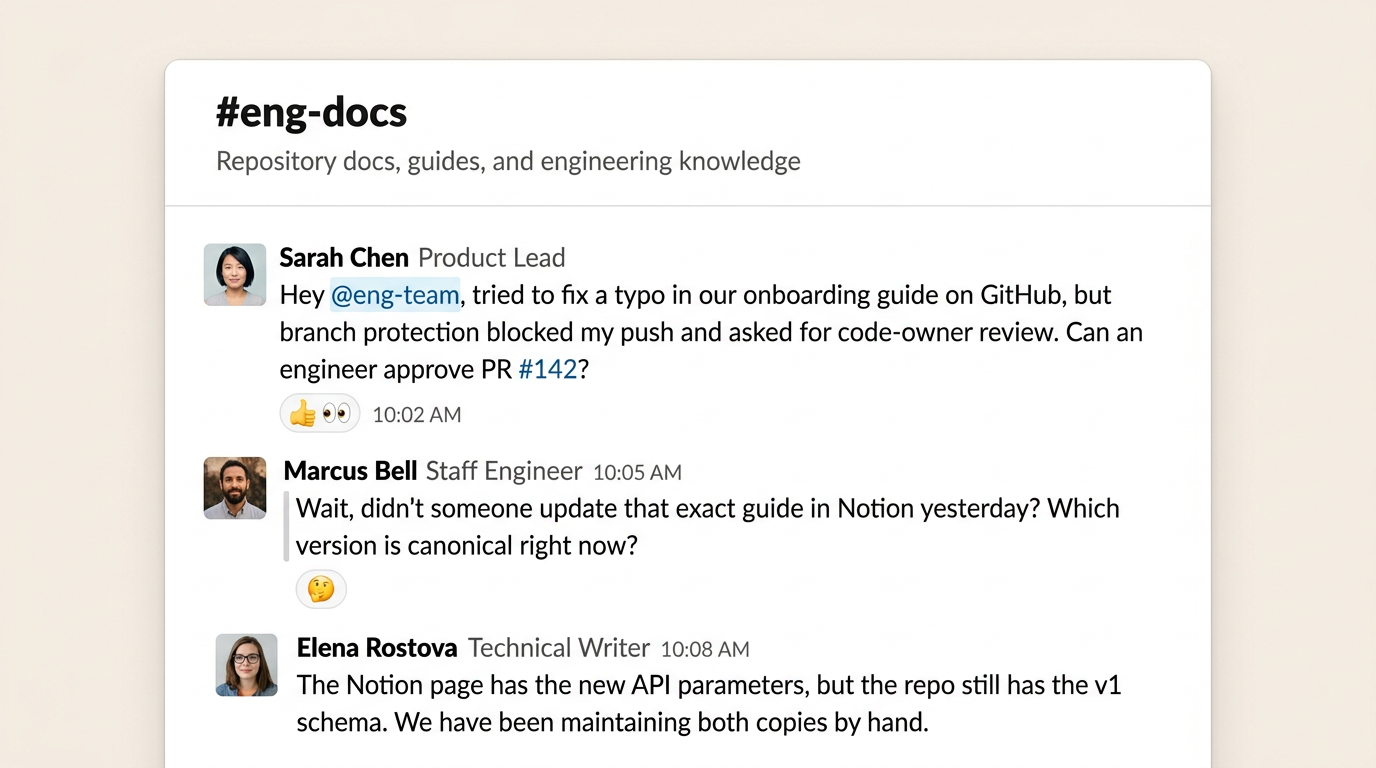
Almost every software company maintains two competing versions of the same docs. Developers update Markdown in GitHub to match code changes, while product teams and writers polish a readable version in a collaborative editor. Each group is right about the tool they chose, but the moment work splits across two platforms, you lose your single source of truth and both copies drift by default.
The documentation split-brain
A single doc often needs both an engineering review and an editorial review. Technical teams need to verify commands and code examples, while cross-functional teams need to clarify explanations, leave comments, and suggest changes. The document is shared, but the workflows are completely different.
Forcing documentation into a single environment creates a compromise that serves neither group well:
- Docs-as-code only: Technical teams stay in their flow, but cross-functional colleagues face steep Git friction. Fixing a typo requires branch management and code diffs. Direct edits stop, tickets pile up, and a one-line copy edit becomes an engineering dependency.
- Docs in a wiki only: Cross-functional teams collaborate easily, but technical teams rarely leave their IDE to update a browser tab. As code evolves, documentation silently falls behind until someone trips on outdated instructions.
Teams settle because neither group can afford to give up their tooling. Because no single platform supported both needs, teams accepted the burden of maintaining two parallel copies, with Markdown in the repository and an editor workspace that mirrors it. This creates a split-brain problem where neither copy is trusted, and time is spent reconciling existing documents rather than writing new ones.
Falconer approaches this by building a single knowledge system that connects directly to the different sources where company knowledge lives, including GitHub repositories, Notion wikis, and Slack discussions. Rather than leaving teams to manage disconnected surfaces that drift apart, Falconer unifies those tools so that repository Markdown and collaborative pages remain one shared document.
Bridging Git and the collaborative editor
The solution is not forcing everyone into a single compromise tool. Technical teams need IDEs, pull requests, and linters. Cross-functional teams need rich formatting, real-time collaboration and suggestion workflows. That is why we built the Two-way sync feature, connecting both environments so that code repositories and collaborative pages share one continuous source of truth.
The core challenge is that Git and collaborative editors represent document state in completely different ways:
- Git is retrospective: It only cares about finished snapshots. To Git, a document is just a plain text file, and it is completely blind to in-progress drafting or who is currently working on a page.
- A collaborative editor is live: It coordinates simultaneous typing as it happens, preserving cursor presence, inline suggestions, and active review threads.
Bridging this gap means treating documentation as a single shared document rather than files passed back and forth. Instead of replacing an entire file, two-way sync updates only the specific sections of the doc that changed. Commits on GitHub land in the editor without disturbing open suggestions, and edits in the editor reach the repository using the team’s review rules.
How changes flow both ways
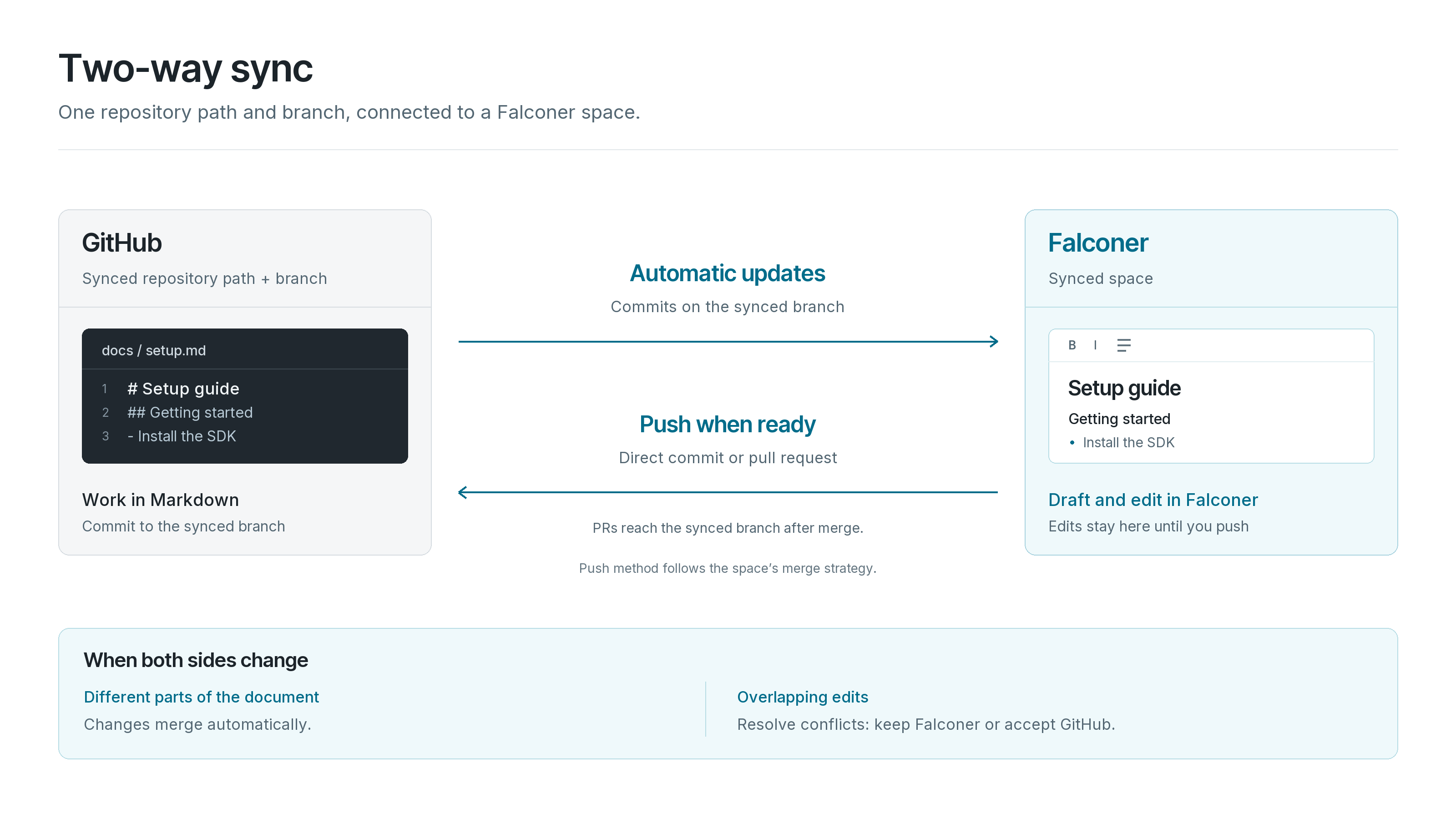
With Falconer’s Two-way sync feature, you connect a Falconer folder to a directory in a GitHub repository. Every document in the selected path maps directly to a Falconer document.
- GitHub to Falconer: Commits on the synced branch flow into the matching documents and branches automatically.
- Falconer to GitHub: Edits in Falconer are pushed back to the repo when you choose to push, using the workflow your team already uses.
1. Pushing on your team’s terms
Every team reviews docs differently, so the merge strategy is a per-space choice:
| Strategy | What happens on push | Good fit for |
|---|---|---|
| Direct commit | Commits straight to the configured branch | Fast-moving internal docs |
| Pull request | Opens or updates a GitHub pull request | Teams that review docs like code |
Repository rules keep applying. If your docs directory needs code-owner approval, a change written in Falconer still gets it.
2. No silent overwrites
Under normal conditions, background sync applies GitHub commits to Falconer documents automatically in real time. When edits collide on the exact same lines, that automatic flow pauses and the file receives a Conflicts status. Falconer prevents silent data loss by holding both versions in a side-by-side diff until someone reviews the differences, resolves the overlap, and pushes the clean result.
3. Nothing disappears without a decision
When a file is deleted on GitHub, Falconer never silently archives the document. Inbound deletions require explicit review, allowing you to either confirm the removal or restore the file and push it back to the repository.
4. Images and media stay attached
Assets referenced in synced Markdown sync in both directions. Push from Falconer and embedded images and media assets are committed with the doc. Commit an asset on GitHub and it renders in Falconer.
5. Preserving developer and writer ergonomics
Technical teams keep their preferred code editor, branch workflows, and pull request reviews. Cross-functional teams keep rich formatting, comments, live suggestions, and real-time collaboration. Throughout the entire process, your repository remains the single deployable source for building and hosting your documentation.
Why this matters for agents too
Documentation drift is disruptive with AI agents in the workflow. Coding agents read repository files for architecture, APIs, and schemas, while enterprise assistants query internal knowledge bases to answer employee and customer questions. When repo Markdown and wikis diverge, agents pull contradictory context and confidently repeat outdated guidance.
Knowledge management has always been constrained by maintenance rather than storage. Two-way sync turns documentation maintenance into automated infrastructure. By keeping repository Markdown and collaborative documents aligned in real time, people and agents always operate from the same verified facts.
Try it
Get started with Two-way sync in a few minutes. Open a Falconer space, click Sync with GitHub, and pick a repository, path, branch, and merge strategy.
Ready to get started?
Create an account and start building your knowledge base — no contracts or credit card required. Or, contact us to design a custom package for your team.